

GST Invoice Management System (IMS): Meaning, Invoice Statuses & Working Explained


30-Second Summary
When businesses receive wrong invoices, multiple entries or supplier amendments, it can be challenging to claim Input Tax Credit (ITC) correctly, leading to ITC mismatches and reconciliation processes. GSTN’s Invoice Management System (IMS) helps simplify this process by enabling the recipients to view the invoices uploaded by the suppliers and take actions like Accept, Reject, Keep Pending or No Action. IMS can help businesses manage ITC better with improved invoice validation and reconciliation which further simplifies GST compliance.
What Is the GST Invoice Management System (IMS)?
The GST Invoice Management System (IMS) is a functionality available on the GST Portal that helps recipients review invoices, debit notes and credit notes uploaded by their suppliers before they are considered for Input Tax Credit (ITC).
Let’s say you have bought goods from a supplier, and you are waiting to claim the Input Tax Credit (ITC). But when you check your GST records, you find that the supplier has uploaded the wrong invoice amount or has entered an incorrect GSTIN. Such mismatches have traditionally meant long reconciliations and relentless follow-up with suppliers.
To facilitate this process GST Network has launched Invoice Management System (IMS).
How Does the GST Invoice Management System (IMS) Work?
The GST Portal has a facility called Invoice Management System (IMS) that enables the recipients to view the invoices and debit or credit notes uploaded by their suppliers before these are considered for Input Tax Credit (ITC).
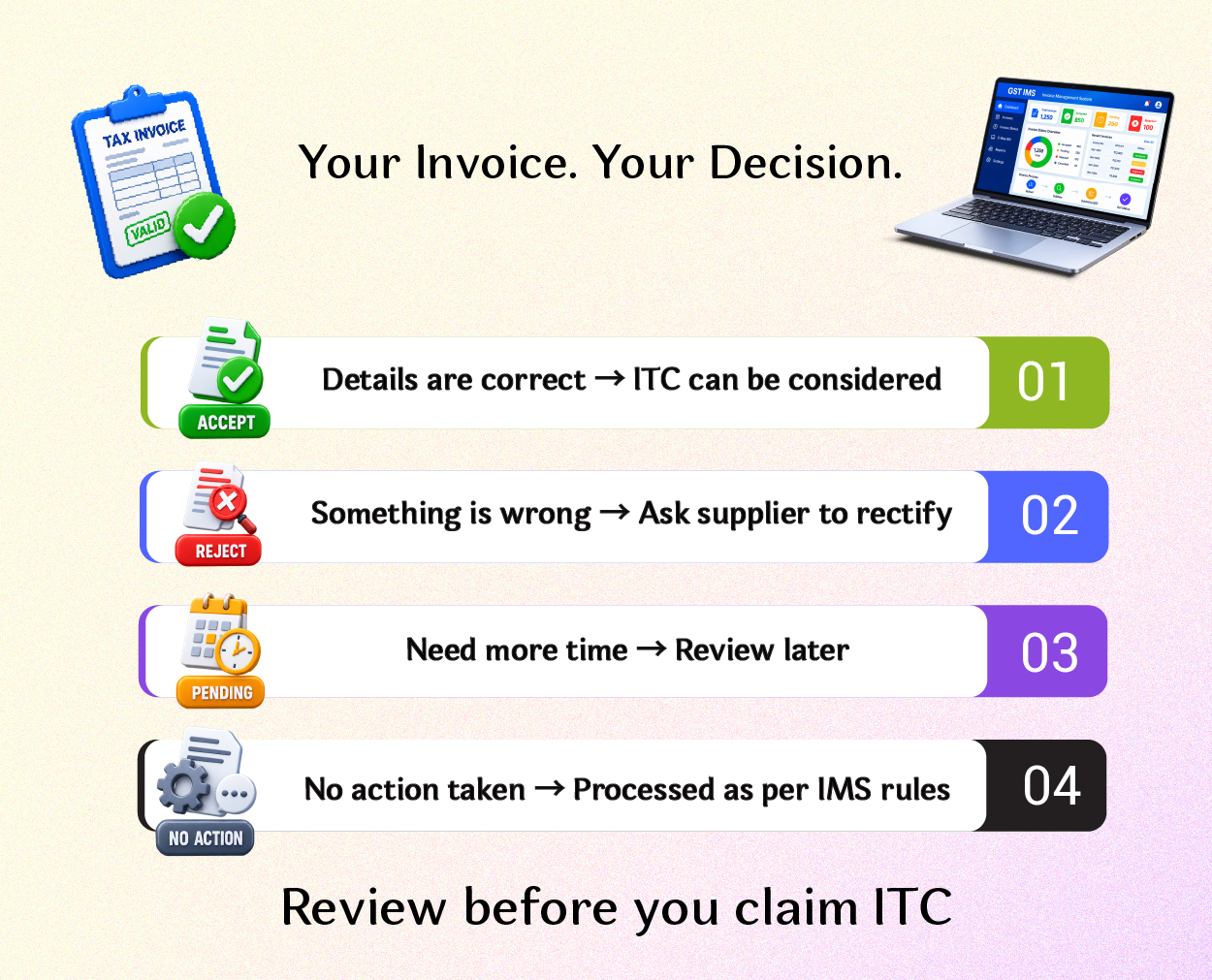
Businesses no longer must blindly accept invoices uploaded by suppliers. Each invoice can be reviewed, and the business can decide to:
- Accept the invoice
- Reject the invoice
- Keep the invoice pending for further review
This makes sure that only the eligible invoices are considered when preparing GST returns.
In short, IMS offers the recipient more control over their purchase data and helps improve the accuracy of ITC claims.
To understand who can claim Input Tax Credit, which credits are eligible or ineligible, and how ITC reversal works, read our detailed guide on ITC Under GST: Eligibility, Ineligible Credits and ITC Reversal.
When Was IMS Introduced in GST?
The facility was launched on the GST Portal in October 2024 and enabled taxpayers to view supplier uploaded invoices before filing their GST returns.
Why Was IMS Introduced in GST? Solving ITC and Invoice Mismatches
Incorrect or incomplete invoice reporting by suppliers has been one of the most common reasons for GST notices and ITC mismatches.
Businesses often find difficulty in the following scenarios:
- GSTIN mentioned on invoices is not correct.
- Uploading repeated invoices.
- Wrong invoice amounts.
- Changes of suppliers after uploading the invoice
- Manual matching of thousands of invoices per month
To address these issues, GSTN brought out the Invoice Management System for the following objectives:
- To give more control to the recipients on Input Tax Credit.
- To enhance the accuracy of matching invoices.
- To minimise mismatches in ITC.
- To minimise manual efforts in reconciliation.
- To enable prompt correction of invoice errors.
- To boost transparency in the GST ecosystem.
IMS allows the recipients to check the invoices before claiming ITC, thereby creating a more dependable and transparent compliance system.
How Does the GST Invoice Management System (IMS) Work? Step-by-Step Process
IMS is a simple and well-structured workflow.
- Step 1- Supplier Uploads Invoice: The supplier uploads invoices, debit notes or credit notes through GSTR-1 or the Invoice Furnishing Facility (IFF).
- Step 2- IMS Invoice Display: The uploaded document can be reviewed in the recipient’s IMS dashboard.
- Step 3- Recipient Reviews Invoice: The recipient confirms details like:
- GSTIN
- Invoice Number
- Date of Invoice
- Value for Taxation
- Amount of GST
- Types of documents
Based on this verification, the recipient selects one of the available actions.
IMS Invoice Statuses Explained: Accept, Reject, Pending and No Action
1. Accepted (Agree):
If the invoice details are correct and the business wants to claim Input Tax Credit, the recipient may accept the invoice. Once accepted, the invoice is considered for ITC in the respective GST return.
Example:
ABC Pvt. Ltd. buys office furniture from XYZ Traders. The supplier uploads the invoice with the correct GSTIN, invoice value and tax amount. On verification, IMS accepts the invoice from ABC Pvt. Ltd. as all details are correct and eligible for ITC.
The invoice is then made available to ITC under the applicable GST provisions.
2. Rejected (Dismissal):
If the recipient finds any mistake in the invoice such as wrong GSTIN, wrong invoice amount, duplicate invoice or any other mistake, he can Reject the invoice in IMS.
By rejecting an invoice, the recipient says that he does not agree with the details provided by the supplier. In such cases, the invoices will not be considered for Input Tax Credit (ITC) unless the supplier rectifies the error and uploads the rectified details in a subsequent return.
Example:
ABC Pvt. Ltd. receives an invoice of ₹50,000, but the supplier mistakenly uploads it as ₹5,00,000 on the GST portal. ABC Pvt. Ltd. does not claim ITC on the wrong invoice but rejects the invoice in IMS and informs the supplier to rectify the invoice in the next filing period. Always tell the supplier straight away why you have rejected it. Timely communication enables suppliers to correct mistakes early and avoid delays in claiming ITC.
3. Pending (Under review):
Sometimes businesses may not have sufficient information to decide whether to accept or reject an invoice. In such cases you can mark the invoice as on Hold.
You can also hold an invoice if you want to allow the recipient more time to check details with the supplier, without immediately affecting the status of the invoice.
This is an option often used by companies when:
- Goods have not been received yet.
- Services are still being validated.
- Discrepancy in purchase order or invoice details.
- Waiting for clarification from the supplier.
Example:
XYZ Ltd. receives an invoice for machinery, but the goods are still in transit. The invoice is Pending till the goods are received and verified. This is because the finance team cannot verify the quantity supplied. This prevents premature acceptance and leaves the invoice open for future action.
4. No Action (Acceptance by Silence):
Not all invoices need to be manually acted upon by the recipient. In case the recipient does not take any action on a regular invoice before the generation of GSTR-2B, the invoice is generally presumed to have been accepted and is considered for Input Tax Credit, subject to the applicable GST provisions.
But this automatic mechanism should not be relied upon by businesses alone. IMS regularly reviews invoices to identify discrepancies before claiming ITC.
Example:
Over the month PQR Enterprises receives ten invoices from suppliers. The accounts team verifies all invoices and makes sure all are correct. They don’t want to update the status of the invoices manually. As there are no discrepancies, the invoices are selected automatically for ITC as per the IMS process.
Inaction can accept invoices, but businesses should check the IMS dashboard on a regular basis to find out any incorrect invoices, duplicate entries or supplier errors before filing their GST returns.
GST IMS: Key Takeaways for Better ITC Management
The Invoice Management System (IMS) is a significant step towards greater accuracy, transparency and efficiency in the Input Tax Credit management under GST. An IMS helps businesses identify discrepancies, reduce reconciliation efforts and improve GST compliance by allowing recipients to view supplier uploaded invoices before they are considered for ITC.
While the system does add additional responsibility to recipients, it affords greater control of ITC claims and minimises the chance of future disputes.
Businesses can further simplify their GST compliance and return filing process by learning GST Filing with TallyPrime, which helps build practical knowledge of GST filing and related accounting processes.
The Invoice Management System is expected to play a key role in making invoice validation more reliable and efficient for businesses of all sizes, as GST continues to move more towards the digital world.
FAQs (Frequently Asked Questions)
Question 1: What is the Invoice Management System (IMS) in GST?
Answer: Invoice Management System (IMS) is a functionality available on the GST Portal to enable recipients to view invoices uploaded by suppliers and take a decision to accept, reject or keep them pending for the purpose of availing Input Tax Credit.
Question 2: When was the IMS introduced?
Answer: GST Network (GSTN) has introduced the IMS and made it available on the GST Portal from October 2024 to improve the invoice matching and ITC reconciliation process.
Question 3: Which are the four invoice statuses available under IMS?
Answer: The four actions available are:
- Accept
- Reject
- Pending
- No Action Needed (Deemed Acceptance)
Each status tells how the invoice is treated for Input Tax Credit.
Question 4: Can an accepted invoice be changed later?
Answer: Once an invoice has been acted upon, any changes thereafter are generally dependent on the supplier making the appropriate changes in their GST return, subject to the relevant GST provisions.
Question 5: Will IMS replace GSTR-2B?
Answer: No. IMS will not replace GSTR-2B. It does not replace the GST Return Filing Process. It is an add-on to the GST return filing process where the recipients can view the invoices before they are considered for ITC.

Nita R
Nita is a content writer specialising in Accounting, Finance, GST, and Taxation. She creates easy-to-understand, research-driven content that simplifies complex financial and tax concepts for learners, professionals, and businesses. Her expertise lies in translating technical accounting and GST topics into practical insights, helping readers stay informed about tax compliance, financial processes, and industry best practices. Through her content, she aims to make accounting and taxation accessible, accurate, and relevant for today's evolving business environment.